For freelancers and agencies
Built for the person who gets the call.
If you look after client sites, a caching problem on a money site is your problem to fix. Caching Out is designed to keep it small.
Same setup on every build
Start every client site from your own baseline.
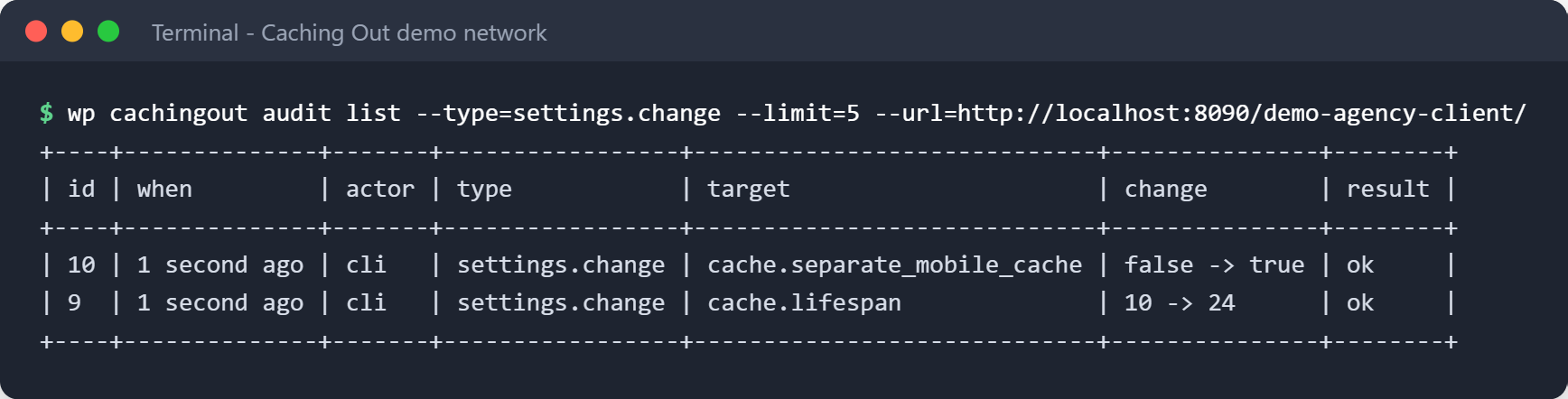
Settings move between sites with licence and API keys stripped out. And wp cachingout audit lists and reverts recent changes from the command line, so you can check a site without opening a browser.
-
Settings export and import Pro only
A settings profile is a file. Keep your baseline in version control and apply it to a new client site in one command.
Credentials are redacted on export, so a profile is safe to share.
-
WP-CLI command set Pro only
Purge, preload, read settings and export or import them from the command line, list and undo recent changes, and manage which files load where:
wp cachingout purge,wp cachingout preload,wp cachingout settings,wp cachingout audit,wp cachingout assets.wp cachingout <command>, with –porcelain output for use in a pipeline.
When a client site acts up
Find out what went wrong – without a support ticket.
See what broke on a client site in minutes, not after an afternoon of guesswork.
-
Something broke. What changed? Pro only
Caching Out shows you what’s changed since your site last worked, with the likely causes first. Try one fix at a time, see it before it’s applied, and undo it in one click if it doesn’t help.
It undoes Caching Out's own settings only; it never rolls back another plugin.
-
See what changed. Undo it if you need to. Pro only
Caching Out keeps a record of every change it makes – who made it, when, and the value before and after – and most can be undone in one click from the Activity page. Activity also records plugin, theme and WordPress updates, activations and removals, with the old and new version, so you can see what changed before a problem started.
Kept on your own server. The record never leaves your site on its own, and passwords and licence keys are never written into it.
-
The Page Audit names what is wrong In the free edition
The Page Audit names what is wrong on a page and whether one of our settings is behind it. Where one of our settings solves it, it is a single click. Where your theme or your host has to change something, it says so plainly instead of pretending we can fix it.
Reads your pages the way a visitor would. No API key needed.
-
Tells you when your host is the problem In the free edition
The Filesystem Check tells you when your host is blocking something: it checks every file it needs and lists what passed, what failed, and the specific fix for each failure.
Runs on activation and on demand.
-
An assistant that already knows your setup Pro only
Ask the assistant and it already knows your setup: it can point to a recent change that explains what you are seeing and offer to undo it. Nothing is undone until you confirm.1
Answers draw on our documentation and the plugin's own decision for your page, with links so you can check. They can be wrong, so check anything important.
Note and caveat (1)
The assistant answers questions about Caching Out and your site's configuration. It is fair-use limited (currently 50 questions a day and 300 a month per licence) and it is not a general-purpose AI chatbot. Answers are generated by an AI model and can be wrong – check anything consequential against the linked documentation. ↩
Running a multisite network?
Run one site, or a whole network.
If your client sites live in one WordPress Multisite network, Network Admin gets its own Caching Out screen.
-
Multisite Network Admin Pro only
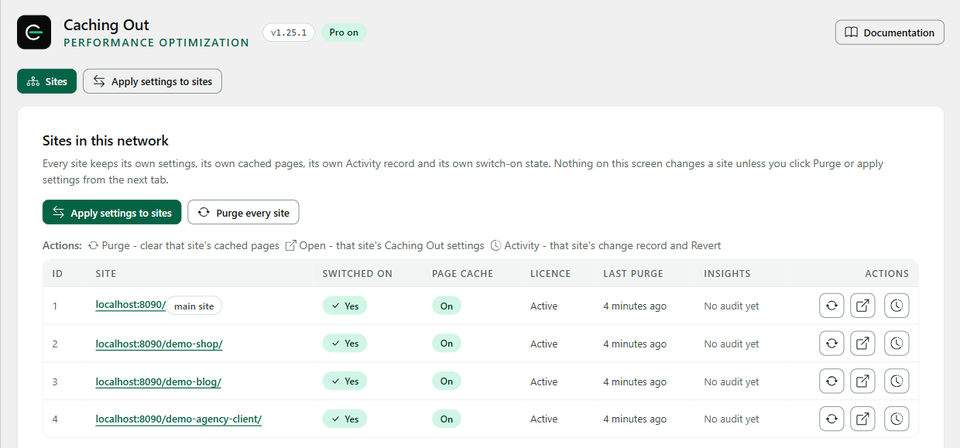
Manage every site in your network from Network Admin: see each site’s state, purge one site, and apply settings to the sites you choose, with a preview of every change first. Each site keeps its own cached pages and its own settings. When one site in the network behaves differently from the others, start with the troubleshooting section of the Multisite documentation.2
Every apply names its sites and shows a per-site preview; each change lands on that site's Activity page with its revert.
-
How a network counts Pro only
Each site in a network is switched on by entering your licence key on that site, and each one counts towards your plan’s site limit: up to 3 sites fits Plus, and 50, 100 or 500 fits the matching Multi size. Networks larger than that are Enterprise – talk to us.
Note and caveat (1)
On a WordPress multisite network each site keeps its own cached pages and its own settings, and each is switched on by its own licence. The Network Admin screen lists every site, purges one site at a time and can copy one section of settings to the sites you choose, showing every change per site before anything is written; nothing is applied network-wide by default, and each site records the change so it can be undone there. ↩
Simple pricing
Every paid plan has every Pro feature.
Every paid plan includes every Pro feature. You are only choosing how many sites – and Multi is the same price at 50, 100 or 500.
-
Single
$59 /year
1 site
One site you care about.
$59 per site
- Every Pro feature
- One year of updates, support and the assistant
-
Plus
$119 /year
3 sites
A shop plus a side project, or a small portfolio.
About $39.67 per site
- Every Pro feature
- One year of updates, support and the assistant
-
For agencies
Multi
$299 /year
50, 100 or 500 sites
Freelancers, agencies and multisite networks.
From $0.60 per site
- Every Pro feature
- One year of updates, support and the assistant
Every Pro plan includes
- Everything in the free edition
- Image compression: JPEG, PNG and WebP, one image at a time on your own server, with a before / after view and one-click restore 3
- Optimize CSS delivery, Delay JavaScript, combine CSS and JS
- Unused CSS/JS: stop plugin files loading on pages that never use them
- Cache preloading and CDN rewriting 4
- Cloudflare, Varnish and Sucuri purge 5
- Find out what went wrong without a support ticket: an Activity record with one-click revert, and an assistant that already knows your setup. Plus Performance Insights. 1
Free edition – $0 – unlimited sites
Not ready for Pro? Start with the free edition.
Page caching that also covers visitors from your social posts and ads, browser caching, GZIP and Brotli, lazy loading, minify and defer, and the full Page Audit – free for as long as you like.
Notes and caveats (3)
You choose each image and see it before and after; Caching Out compresses one image at a time rather than a whole library. JPEG, PNG and WebP images in the Media Library (PNG losslessly, so savings are usually small; animated and lossless WebP are left as they are); pixel dimensions never change. How much smaller an image gets depends on the image. AVIF copies need server support. Performance results vary depending on hosting, theme, plugins and traffic. Benchmark figures are measured on our published test suite and are not a guarantee of results on any specific site. ↩
One CDN hostname per site. Caching Out rewrites the URLs of your CSS, JavaScript, images, fonts and video to that hostname; you keep full control over which file types are rewritten and which paths are excluded. ↩
Caching Out clears individual URLs from Varnish out of the box. A full Varnish flush needs a purge-capable VCL configuration on your server; ask your host or your systems administrator whether yours has one. ↩
Before you decide
The questions agencies actually ask.
If yours is not here, ask us and we will add it.
Can I use it on client sites?
How does WordPress multisite count?
What if I need more sites later?
One decision left
You already know how many sites you run.
That is the whole decision. Every paid plan carries every Pro feature, and the refund window means you can change your mind after you have seen it work.
- No code required
- Setup in under 3 minutes
- 14-day money-back guarantee