Features
Everything in one plugin. Built so nothing breaks.
Before launch we scanned the source code of the 2,000 most-installed WordPress.org plugins – 60,711 signals, 11,258 candidate rules – so the clashes are found in their code, not on your site. Every feature below says whether it is free or Pro, and every Pro feature is in every paid plan.
Caching
Serve a page without building it twice.
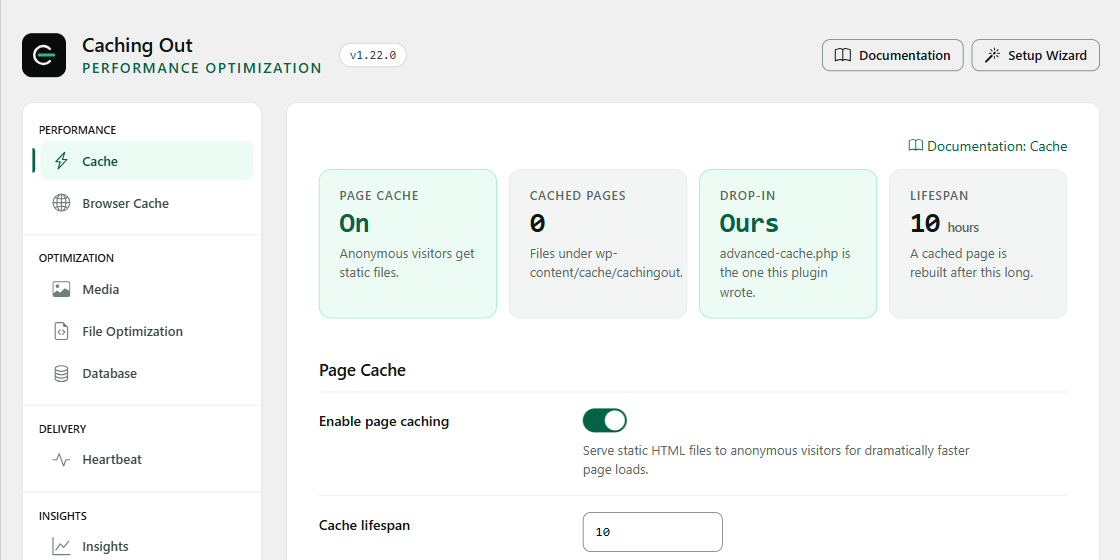
The page cache is the single largest win available on most WordPress sites, and it is on from the moment you activate the free edition.
-
Page caching In the free edition
The first visitor generates the HTML; everyone after that is served the finished file. WordPress, your theme and your plugins are never asked to build the same page twice. Visitors arriving from Facebook, Instagram, Google Ads, TikTok or a campaign link get the cached page too: the tracking parameters those links add (fbclid, gclid, utm_ and the like) are ignored by the cache out of the box.
Static HTML written to wp-content/cache/, served from advanced-cache.php before plugins load.
-
Separate mobile and desktop caches In the free edition
A theme that renders differently on a phone gets its own cached copy, so a desktop layout is never served to a mobile visitor.
Device class is part of the cache key, alongside host, scheme, path and language.
-
Logged-in visitors are never cached In the free edition
Anyone carrying a session, an auth cookie or a cart always gets a freshly built page. This is not a setting you have to find.
One chokepoint decides cacheability; session and auth cookies bypass the cache unconditionally.
-
Cache preloading Pro only
Turn preloading on and your sitemap is crawled after a purge, so the cache is warm before a real visitor arrives rather than being built at their expense.
Sitemap-driven crawler, rate-limited, resumable, and re-triggered by every purge event.
-
Custom exclusions In the free edition
Keep any URL, cookie or user agent out of the cache using simple patterns with wildcards – on the Cache tab.
Checked in the same chokepoint that makes every other cache decision, so the drop-in honours them before WordPress loads.
Delivery
Send fewer bytes, and send them from closer.
Caching decides how fast the page is built. Delivery decides how fast it arrives.
-
GZIP and Brotli compression In the free edition
Text responses are compressed before they leave the server – Brotli where your host supports it, GZIP everywhere else – and it is switched on, with the rules written into your server configuration, the moment you activate. No editing files by hand.1
Rules written through a hardened writer: the file is backed up first, the output is sanity-checked, and another plugin's block is never overwritten.
-
Browser caching headers In the free edition
On from the moment you activate: returning visitors stop re-downloading your CSS, fonts and images on every page view.
Far-future Expires and Cache-Control headers on static assets, set per file type.
-
CDN integration Pro only
Point your assets at your CDN hostname without editing a single theme file.2
Output-buffer rewrite of asset URLs to one hostname per site, with per-file-type and per-path exclusions.
Notes and caveats (2)
Brotli compression requires your server to support it. Where it is not available, Caching Out uses GZIP, which is supported effectively everywhere. The plugin checks before writing anything, checks the result and replaces the file in one step (if the file cannot be written, nothing is written at all), and never overwrites a block belonging to another plugin. ↩
One CDN hostname per site. Caching Out rewrites the URLs of your CSS, JavaScript, images, fonts and video to that hostname; you keep full control over which file types are rewritten and which paths are excluded. ↩
Files
Fewer requests, and none of them blocking.
This is the group most likely to change how a page looks, so every option here is off until you turn it on.
-
CSS and JavaScript minification In the free edition
Comments, whitespace and dead characters are stripped from your stylesheets and scripts. One switch, off until you choose it.
Minified copies are written once to the cache directory and reused until the source changes.
-
Combine into fewer files Pro only
Merge your stylesheets and scripts into fewer files so the browser makes fewer requests. One switch, off until you choose it, because it can change how a page looks.
Combined files are named by their content, and the write is verified before any page references it.
-
Optimize CSS delivery Pro only
Caching Out reads which elements sit at the top of each page, pulls the styles they need into the page itself and loads the rest after the page has painted, so styles stop blocking the first render. Any stylesheet that lays out the top of the page – your theme’s own stylesheet included – is left render-blocking rather than risk the page moving as it loads, and the Page Audit shows you which ones and why. Off by default.
Heuristic extraction with a coverage check – not per-page generated critical CSS. The Page Audit lists any stylesheet left render-blocking and offers a recorded, revertible Excluded CSS fix.
-
Deferred JavaScript In the free edition
Scripts that are not needed for the first paint wait their turn. This is the setting most likely to break something, so it names what to check.
defer on chosen handles, with a per-handle exclusion list for anything that must run immediately.
-
Google Fonts Pro only
Combine every Google Fonts request into one and make text visible while the font loads – or go further and self-host the font files from your own server, in modern WOFF2 format, refreshed weekly.
Font files are fetched to your server and refreshed weekly, with the stylesheet rewritten to local URLs.
Image compression
See each image before and after, and choose.
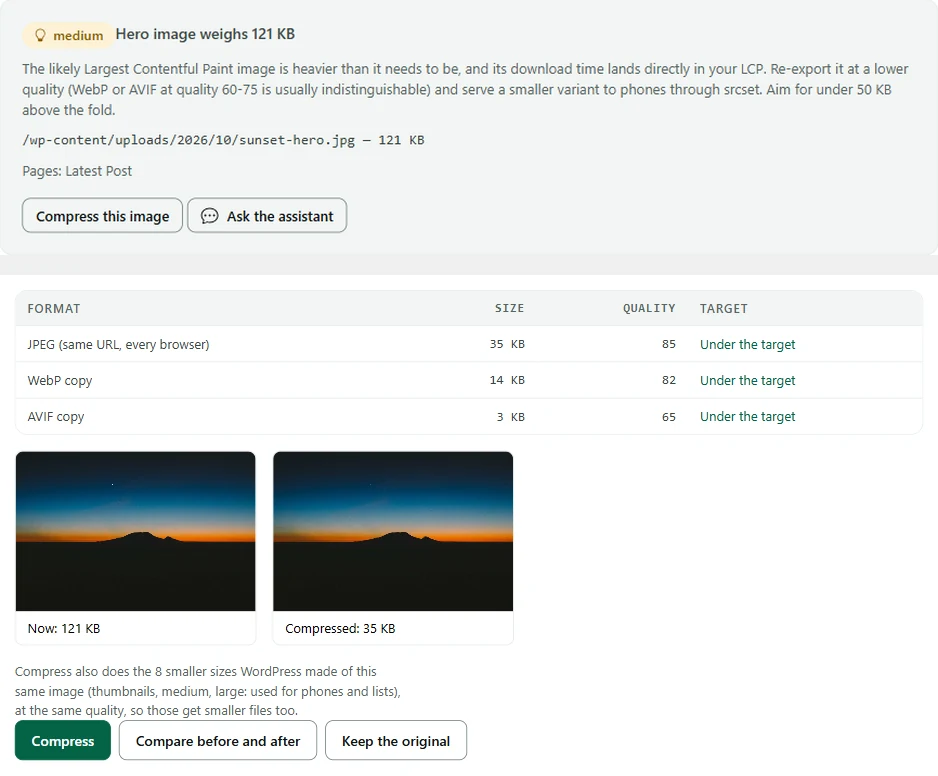
Pick heavy images from your Page Audit and review them in one place. One image at a time, on your own server; nothing is uploaded anywhere.
-
Image compression Pro only
Pick an image (from the Page Audit’s ‘Hero image weighs …’ finding or the Media Library) and Caching Out makes it smaller on your own server: the same image at the same address for every browser, Safari and iPhones included, plus WebP and AVIF copies for browsers that accept them. See each image before and after, and choose.3
One image at a time. JPEG, PNG and WebP images in the Media Library.
-
Picked from your Page Audit Pro only
Pick heavy images from your Page Audit and review them in one place: see each image before and after, and choose.3
The audit's 'Hero image weighs …' finding carries Compress this image; the Media Library lists every image's state.
-
Restored with one click Pro only
Nothing is uploaded anywhere, and every image can be restored to its exact original with one click.3
An exact backup is kept before anything is replaced; Restore puts the original bytes back.
Note and caveat (1)
You choose each image and see it before and after; Caching Out compresses one image at a time rather than a whole library. JPEG, PNG and WebP images in the Media Library (PNG losslessly, so savings are usually small; animated and lossless WebP are left as they are); pixel dimensions never change. How much smaller an image gets depends on the image. AVIF copies need server support. Performance results vary depending on hosting, theme, plugins and traffic. Benchmark figures are measured on our published test suite and are not a guarantee of results on any specific site. ↩
Media
Load the image they are looking at.
On an image-heavy page this is usually the difference between a fast site and a slow one.
-
Lazy loading for images, iframes and videos In the free edition
On out of the box. Self-hosted videos do not download until they are about to come into view; autoplay videos play only while on screen and pause when you scroll away; embedded YouTube and Vimeo players pause off screen too. Your hero image is given priority so it appears sooner.
Native loading="lazy" with reserved width and height, so nothing shifts as images arrive.
-
WebP and AVIF delivery Pro only
Serve the WebP and AVIF copies of your images that already exist on your server: each browser gets the newest format it supports, and the rest get the original. Copies from most conversion plugins are recognised, and a copy larger or older than its original is never used. Serving never converts anything; Image compression, above, makes copies for the images you compress. Off until you switch it on.4
Each format has its own cached copy of the page, and a browser only ever receives a copy in a format it announced.
-
Width and height restored In the free edition
Missing image dimensions are filled in automatically, so your layout does not jump while images load.
Part of the lazy-load module, enabled with the same switch.
-
Click-to-load YouTube Pro only
Replace YouTube embeds with a lightweight thumbnail that loads the player only when the visitor clicks it. Off until you switch it on.
Note and caveat (1)
Caching Out serves WebP and AVIF copies of your images to browsers that support them, when those files already exist on your server. It does not convert your images in bulk – use an image conversion plugin for that, and Caching Out will deliver the results; Caching Out Pro can also compress one image at a time and make its copies. Safari supports both formats but does not announce them, so it may receive the original images. Caching Out never sends your images anywhere. ↩
Database
Clean up what nobody is reading.
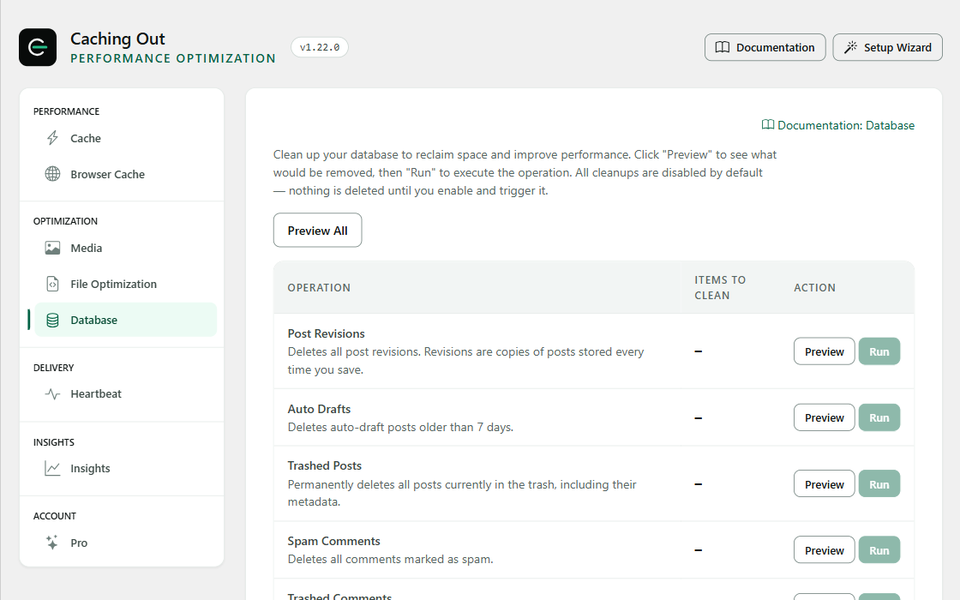
Deletions are irreversible, so nothing here runs without showing you the count first.
-
Revisions, drafts and trash In the free edition
A post edited forty times keeps forty copies. You choose what goes and what stays.
A pre-cleanup summary lists the exact row count per category before anything is deleted.
-
Spam comments and transients In the free edition
Expired transients and spam left by plugins that never cleaned up after themselves.
Only tables WordPress owns are touched. Plugin tables need an explicit opt-in.
-
Scheduled cleanup Pro only
Set it to run weekly and stop thinking about it, or leave it manual and run it when you choose.
A WP-Cron event you can inspect, reschedule or remove from WP-CLI.
Integrations
One purge, every layer.
A stale copy at the edge is indistinguishable from a bug, and it is the most common cause of "I updated the page and nothing changed".
-
Cloudflare Pro only
Editing a post clears it from Cloudflare at the same moment it clears from your own cache.
API purge by URL, with an account-wide purge available manually.
-
Varnish Pro only
For hosts that run Varnish in front of PHP. When Caching Out clears a page it tells Varnish to clear it too – including when you clear the cache by hand.5
Configurable PURGE requests to the host and port your provider documents.
-
Sucuri Pro only
Sites behind the Sucuri firewall get the same purge treatment as everything else.
API purge on the same events, using a key you store in the plugin settings.
Note and caveat (1)
Caching Out clears individual URLs from Varnish out of the box. A full Varnish flush needs a purge-capable VCL configuration on your server; ask your host or your systems administrator whether yours has one. ↩
Safety
Your cart is never cached. Not by default, not ever.
For a shop this is the buying decision, so it is a section rather than a line in the FAQ.
-
WooCommerce and EDD exclusions In the free edition
Cart, checkout and account pages are left completely alone – never cached and never optimised – from the moment caching is switched on, before you configure anything. So is any visitor carrying a cart, login or session cookie.
Shipped as default exclusions, registered into the same chokepoint that answers every other cache decision.
-
Multilingual caching In the free edition
Each language gets its own cached pages on WPML and Polylang sites that give each language its own URLs.6
Language is a dimension of the cache key; anything the key cannot distinguish safely bypasses the cache.
-
A kill switch that always works In the free edition
One line in
wp-config.php–define( 'CACHINGOUT_DISABLE_CACHE', true );– turns all caching off immediately, in every version, forever. No wp-admin needed.define( 'CACHINGOUT_DISABLE_CACHE', true ) – documented, permanent, and never removed in a release.
-
Never overwrites another caching plugin In the free edition
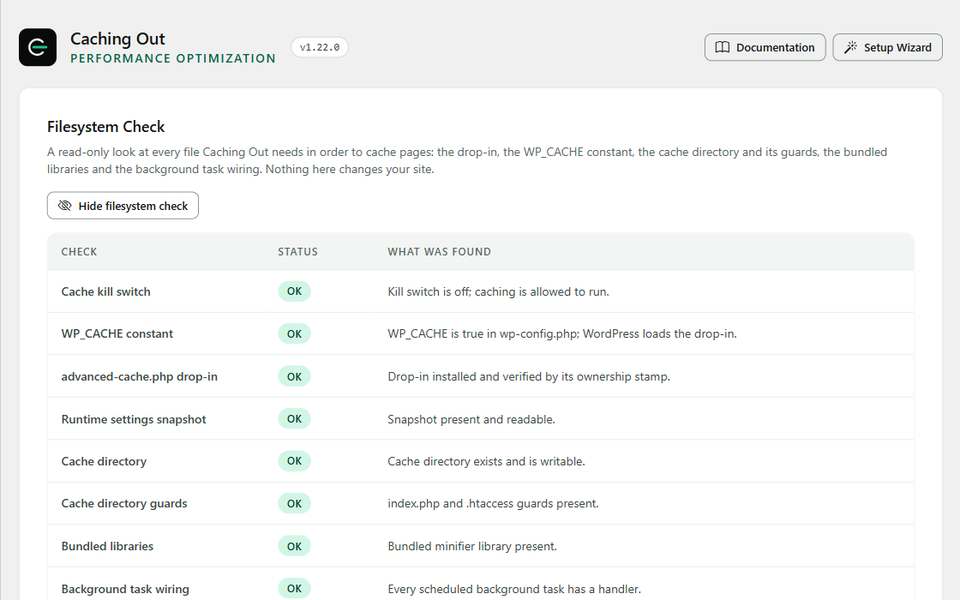
Caching Out stamps the file it writes and checks the stamp before it ever writes again. If the file belongs to another caching plugin, or to something it does not recognise, it leaves it exactly where it is, tells you which plugin it found, and keeps every other optimisation running.
An ownership stamp on advanced-cache.php, checked before every write; another plugin's block in your server configuration is never touched.
Note and caveat (1)
Per-language caching applies to WPML and Polylang sites where each language has its own URLs – a subdirectory such as /fr/ or a separate domain. That covers most multilingual sites. If your site serves several languages from the same URL using a cookie, or runs a multi-currency store, Caching Out deliberately does not cache those pages at all, because serving one visitor's language or currency to another would be worse than serving an uncached page. ↩
Developer
Run one site, or a whole network.
Everything the interface does, a command does too – and on a multisite network, one screen runs every site.
-
WP-CLI command set Pro only
Purge, preload, read settings and export or import them from the command line, list and undo recent changes, and manage which files load where:
wp cachingout purge,wp cachingout preload,wp cachingout settings,wp cachingout audit,wp cachingout assets.wp cachingout <command>, with –porcelain output for use in a pipeline.
-
Filters and hooks In the free edition
Register your own exclusion rules and purge events from a plugin or a theme, rather than pasting URLs into a settings box.
Compat modules use the same public API you do – no private path, no special case.
-
Settings export and import Pro only
Configure one site the way you like it, then start every future build from that baseline instead of from ours.
A JSON profile, versioned, diffable and safe to keep in your own repository.
-
Multisite Network Admin Pro only
Manage every site in your network from Network Admin: see each site’s state, purge one site, and apply settings to the sites you choose, with a preview of every change first. Each site keeps its own cached pages and its own settings.7
Every apply names its sites and shows a per-site preview; each change lands on that site's Activity page with its revert.
Note and caveat (1)
On a WordPress multisite network each site keeps its own cached pages and its own settings, and each is switched on by its own licence. The Network Admin screen lists every site, purges one site at a time and can copy one section of settings to the sites you choose, showing every change per site before anything is written; nothing is applied network-wide by default, and each site records the change so it can be undone there. ↩
WP-CLI
-
Clear everything and rebuild the cache from the sitemap -
wp cachingout purge --all -
wp cachingout preload --sitemap -
Success: 1,284 URLs queued. -
Apply one profile across a portfolio -
wp cachingout settings export > baseline.json -
wp cachingout settings import baseline.json
Tested against what you already run
- WooCommerce
- Elementor
- WPML
- Polylang
- Cloudflare
- Yoast
- Divi
- Varnish
Simple pricing
Every paid plan has every Pro feature.
Every paid plan includes every Pro feature. You are only choosing how many sites.
-
Single
$59 /year
1 site
One site you care about.
$59 per site
- Every Pro feature
- One year of updates, support and the assistant
-
Recommended
Plus
$119 /year
3 sites
A shop plus a side project, or a small portfolio.
About $39.67 per site
- Every Pro feature
- One year of updates, support and the assistant
-
Multi
$299 /year
50, 100 or 500 sites
Freelancers, agencies and multisite networks.
From $0.60 per site
- Every Pro feature
- One year of updates, support and the assistant
Every Pro plan includes
- Everything in the free edition
- Image compression: JPEG, PNG and WebP, one image at a time on your own server, with a before / after view and one-click restore 3
- Optimize CSS delivery, Delay JavaScript, combine CSS and JS
- Unused CSS/JS: stop plugin files loading on pages that never use them
- Cache preloading and CDN rewriting 2
- Cloudflare, Varnish and Sucuri purge 5
- Performance Insights, an Activity record with one-click revert, the assistant 8
Free edition – $0 – unlimited sites
Not ready for Pro? Start with the free edition.
Page caching, browser caching, GZIP and Brotli, lazy loading, minify and defer, and the full Page Audit – free for as long as you like.
Note and caveat (1)
The assistant answers questions about Caching Out and your site's configuration. It is fair-use limited (currently 50 questions a day and 300 a month per licence) and it is not a general-purpose AI chatbot. Answers are generated by an AI model and can be wrong – check anything consequential against the linked documentation. ↩
Ready when you are
You have read the whole list. Now watch it run.
Every paid feature above is in every paid plan, and caching is on from the moment you activate the free edition.
- No code required
- Setup in under 3 minutes
- 14-day money-back guarantee
- 14-day money-back guarantee
- Works on standard shared and managed hosting
- Renews yearly, cancel any time